What It Does
LaunchKit is a complete domain lifecycle tool built on top of the name.com API. It starts before you buy a domain (AI name generation with trademark warnings) and stays useful after you launch (branded links, email, security, DNS, brand protection, webhooks). Every feature is something founders currently pay for separately — or skip entirely because it’s too hard to set up.
The app has nine feature areas. Each one maps directly to name.com API endpoints. Nothing is mocked: every action in the UI makes real API calls against the name.com sandbox.
Nine Features, One App
AI Name Generation
Describe your business. Claude generates 8 brand names with rationale. Live availability across .com, .io, .co, .app, .ai with trademark warnings via CheckDomainClaims.
Link Hub
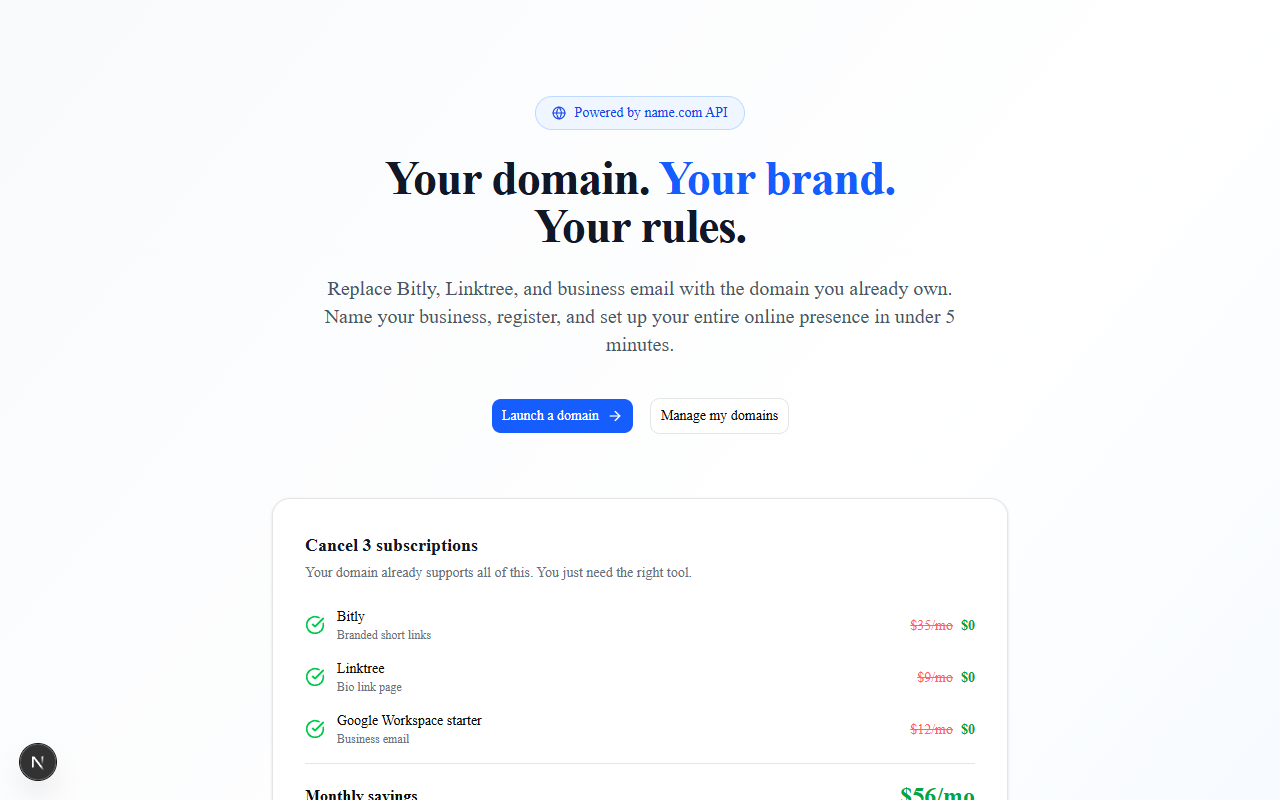
Branded short links on your own domain: /instagram, /book, /sale. Click counts tracked server-side. Visible in the dashboard. Bitly charges $35/mo for this.
Brand Page
Live shareable bio page at /b/[domain]. Brand name, tagline, bio, CTA button, link cards. 6 animated themes. AI Brand Kit generates all copy in one click.
Email Hub
[email protected] forwarded to any Gmail. Name.com sets the MX records. No Google Workspace subscription needed.
Security Center
Transfer lock, WHOIS privacy, auto-renew, DNSSEC surfaced as a 0–4 score with one-click fixes and plain-language explanations. None of this guidance exists in name.com’s own dashboard.
Brand Protection
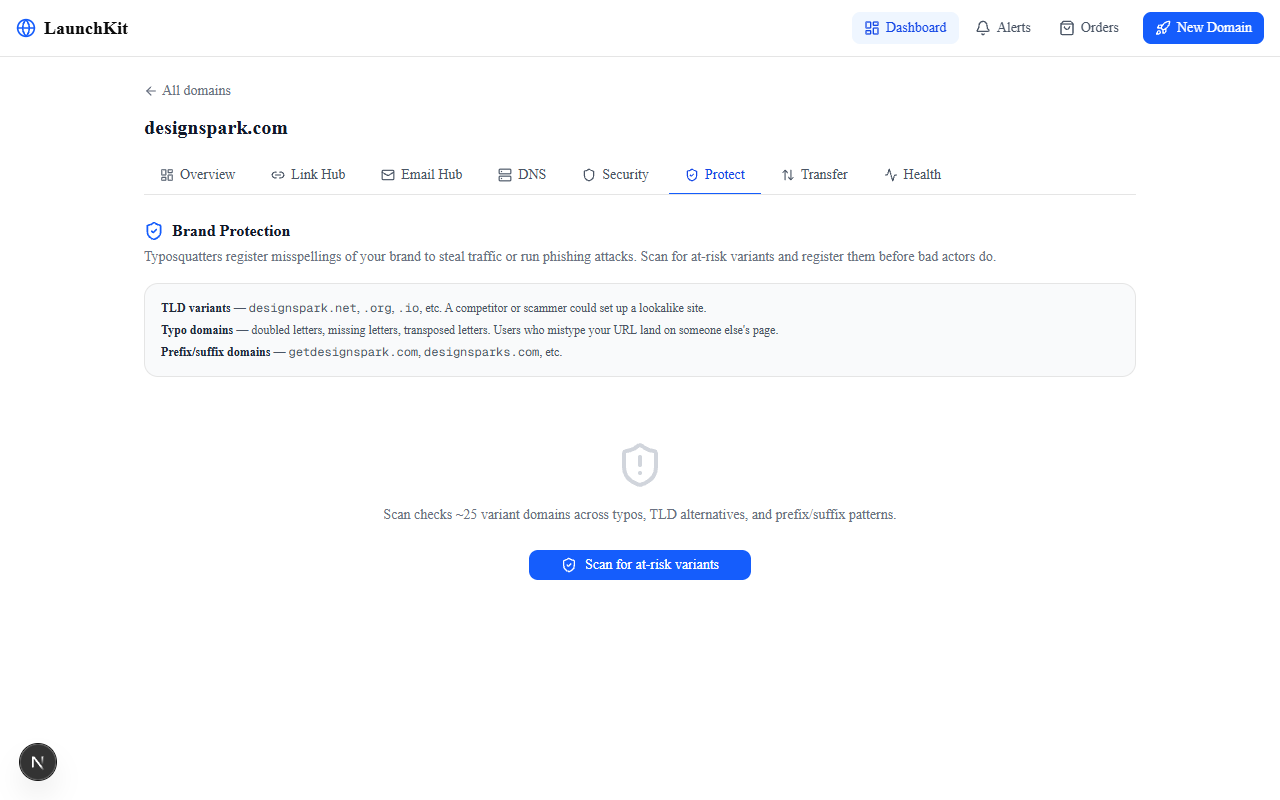
25 typo/TLD/prefix variants scanned in a single CheckAvailability call. Brand Safety Score 0–100. Green = register defensively. Red = already taken — a potential squatter threat.
DNS Manager
Full CRUD for A, CNAME, MX, TXT, SRV, CAA records — grouped by type with inline hints. Add, edit, delete without leaving the app.
Notification Center
Self-hosted webhook receiver built into LaunchKit. Subscribe to 8 event types. Watch payloads arrive live. Pipe them to Slack, your CRM, or any downstream system.
Orders & Transfers
Full purchase history with refund requests. Transfer manager: auth code to move out, cancel unauthorized outbound transfers, check eligibility for inbound transfers.
What It Replaces
The $56/month figure is real. These are actual subscription prices for the tools founders typically open the day they register a domain. LaunchKit replaces all of them using name.com’s existing infrastructure — no third-party accounts, no monthly fees.
Branded Short Links
URL forwarding on your own domain. Click tracking in the dashboard. No Bitly account.
Brand Bio Page
Live shareable page at your domain. 6 themes, CTA button, AI-generated copy. More control, no subscription.
Professional Email
[email protected] forwarding. Name.com sets MX records. Lands in Gmail. No Google subscription.
Beyond the $56/month: brand protection typically requires a lawyer or brand agency to monitor for typosquatters. LaunchKit does it in a two-second scan. Legal protection that used to cost thousands — no agency needed.
See Every Screen
12 screens covering the full lifecycle — from AI name generation to brand protection. Each screenshot was captured from the running app against the name.com sandbox with real data.
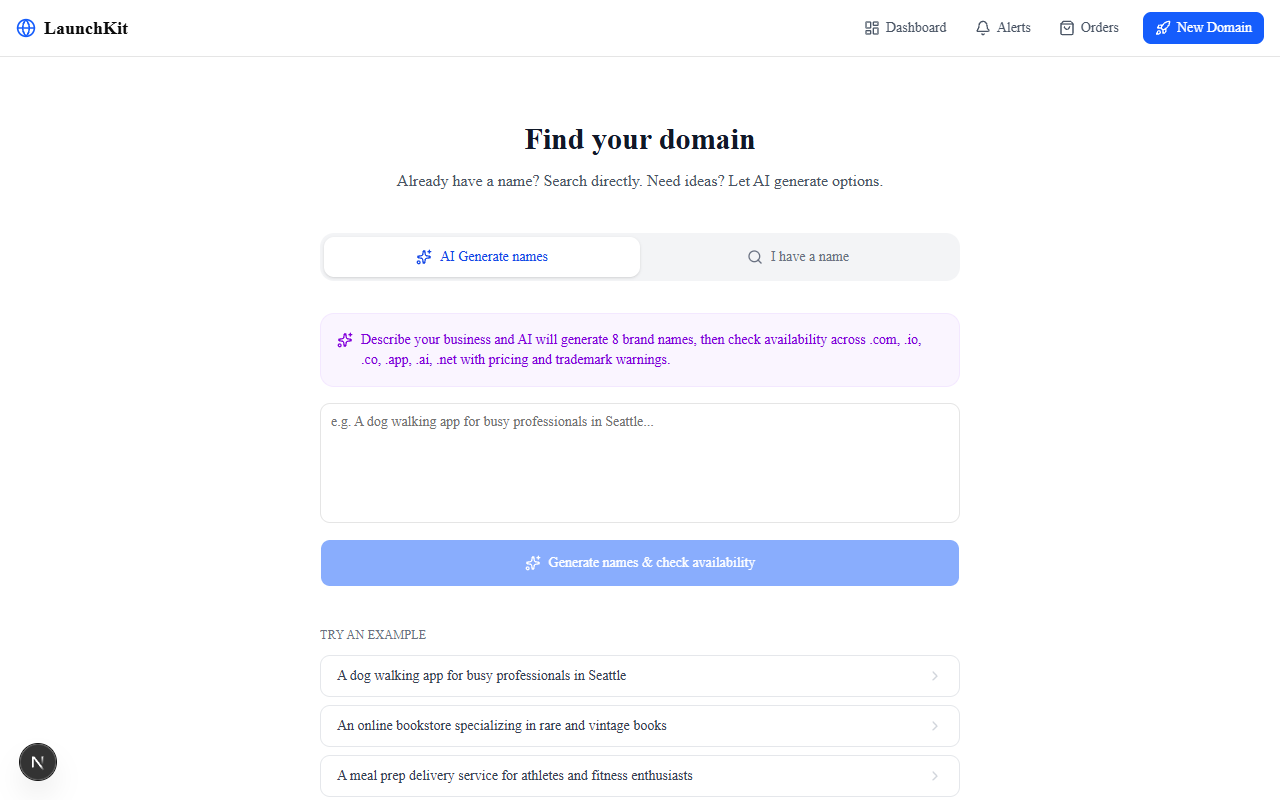
Search and CheckAvailability check all five TLDs at once. CheckDomainClaims adds trademark warnings before you spend a dollar. Pricing from TldPriceList. Five API calls, one page.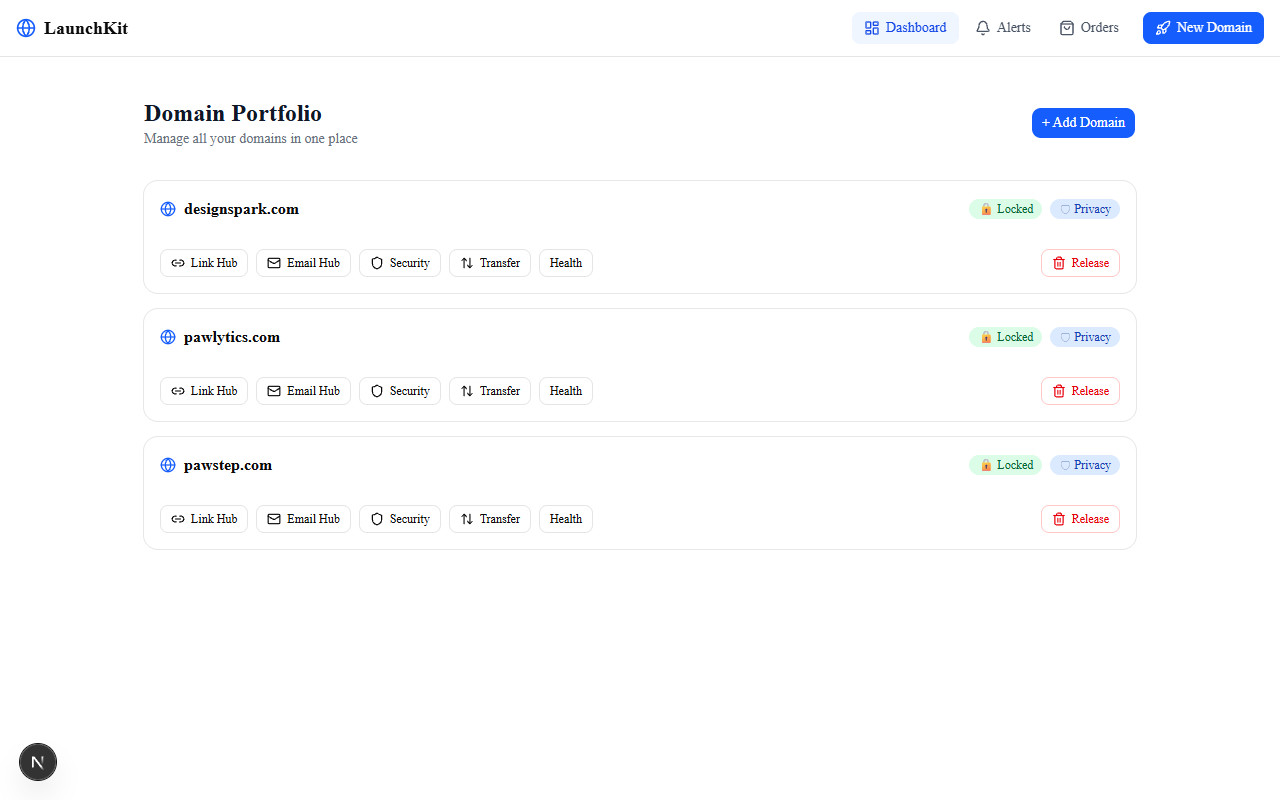
ListDomains. Each card shows expiry countdown and lock status. Domains expiring within 60 days get a warning badge. One click into any domain opens the full management panel.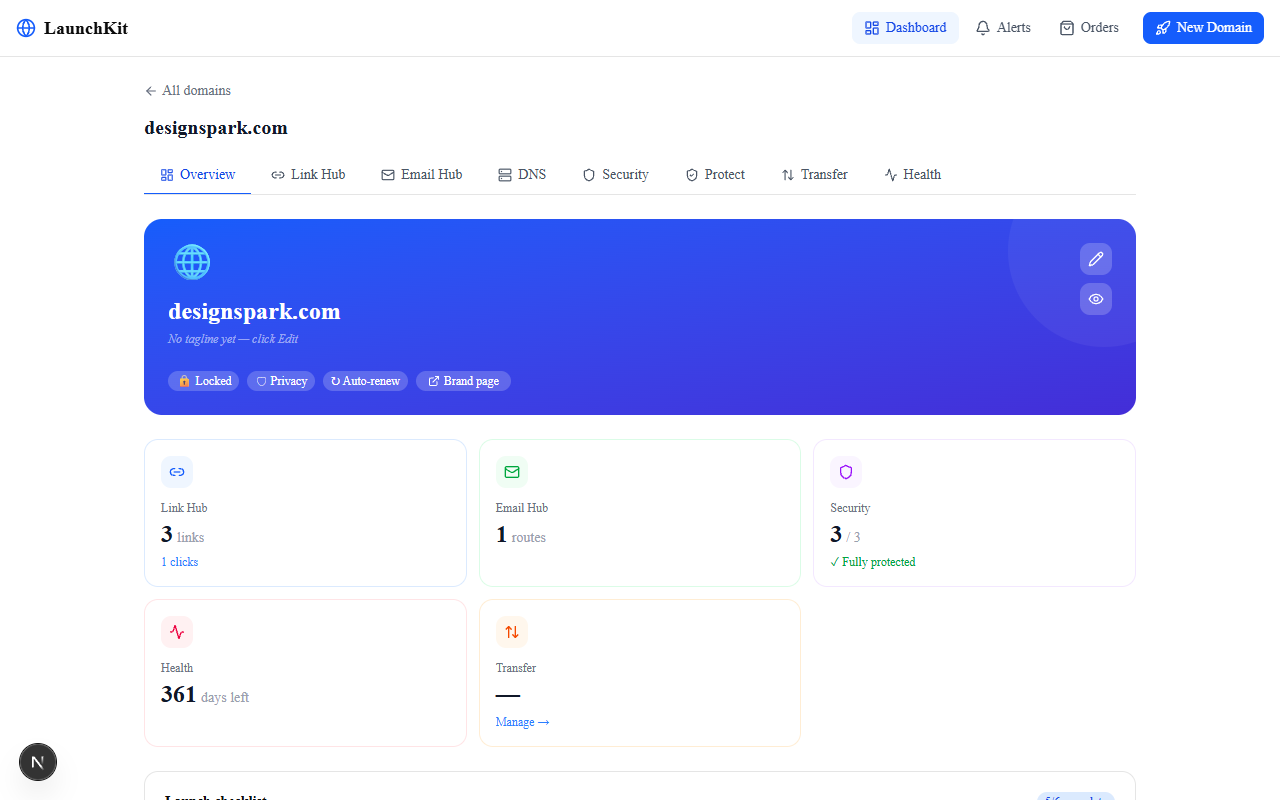
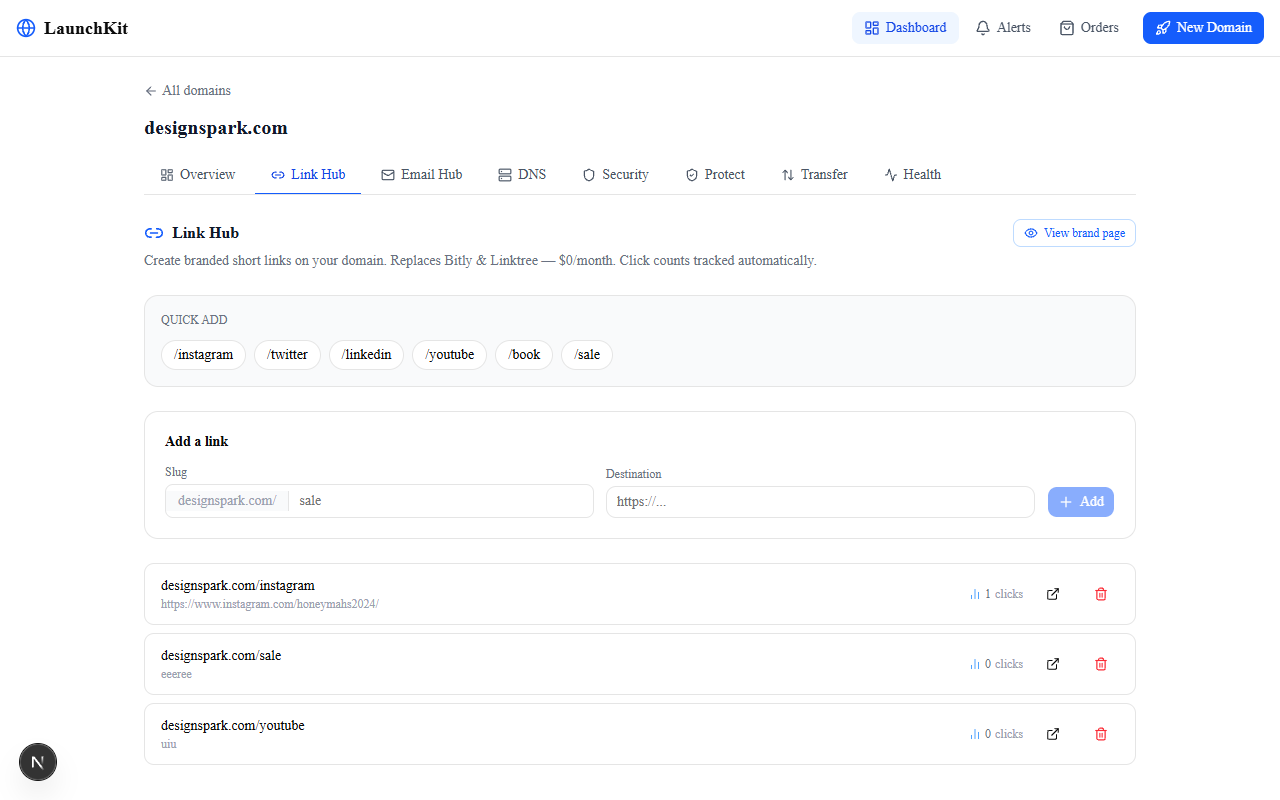
/instagram, /book, /summer-sale via CreateURLForwarding. Edit and delete in-place. Click counts shown per link — tracked silently on the public brand page, visible here.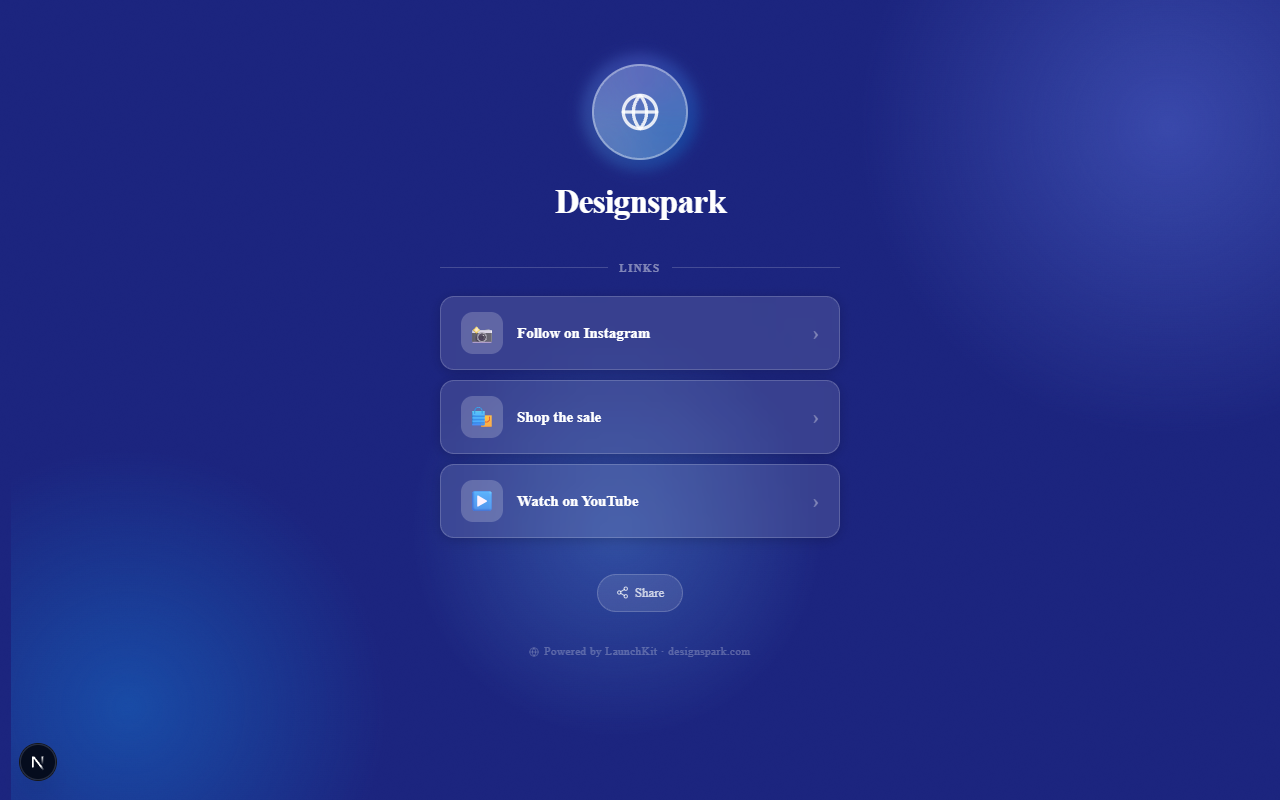
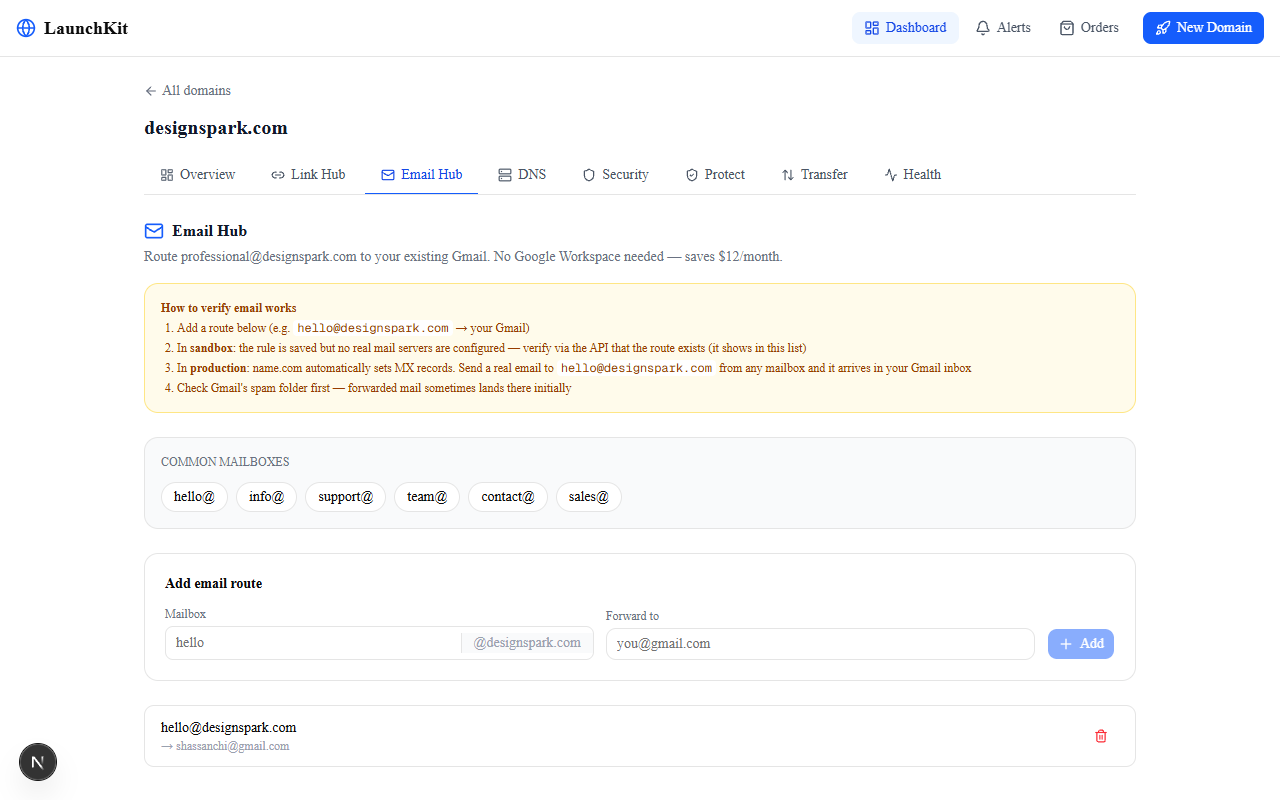
CreateEmailForwarding sets up [email protected] → your Gmail. Name.com writes the MX records. Add, edit, and delete routes. No subscription. Saves $12/month for any one-person business.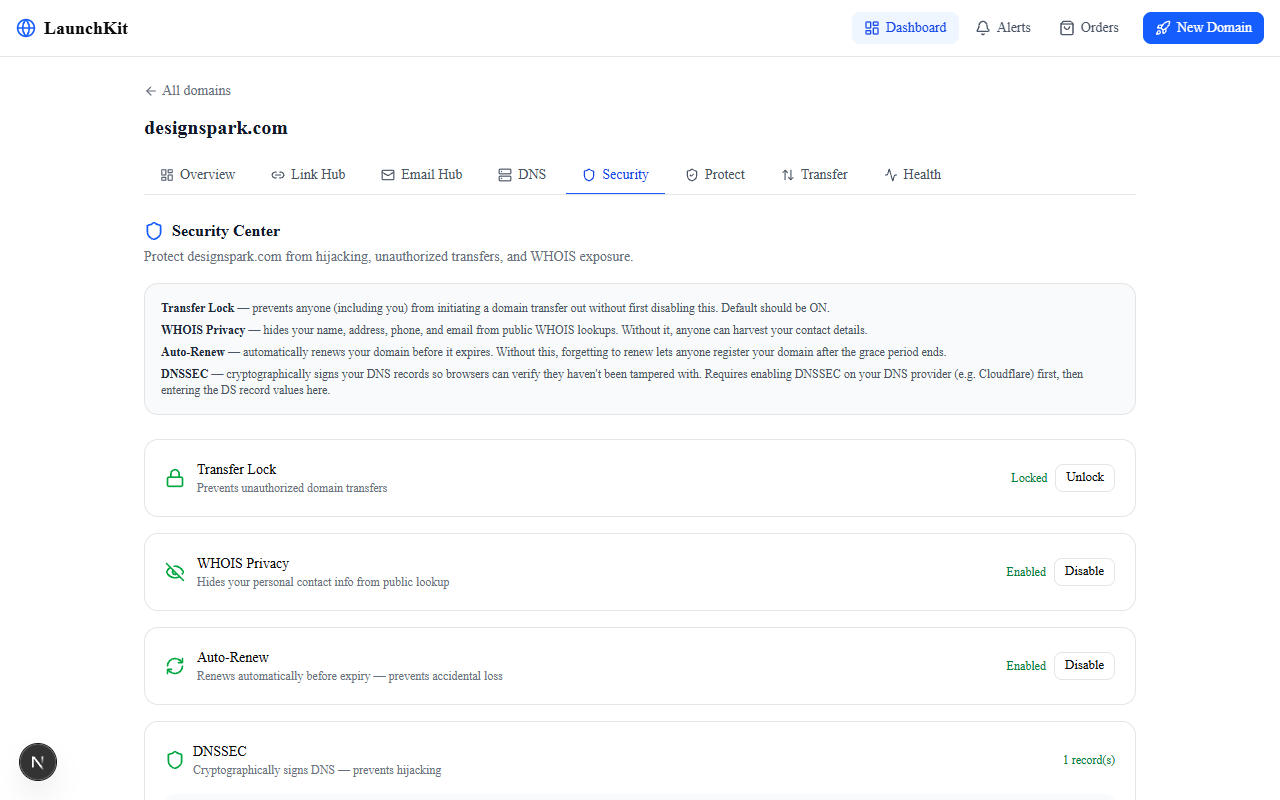
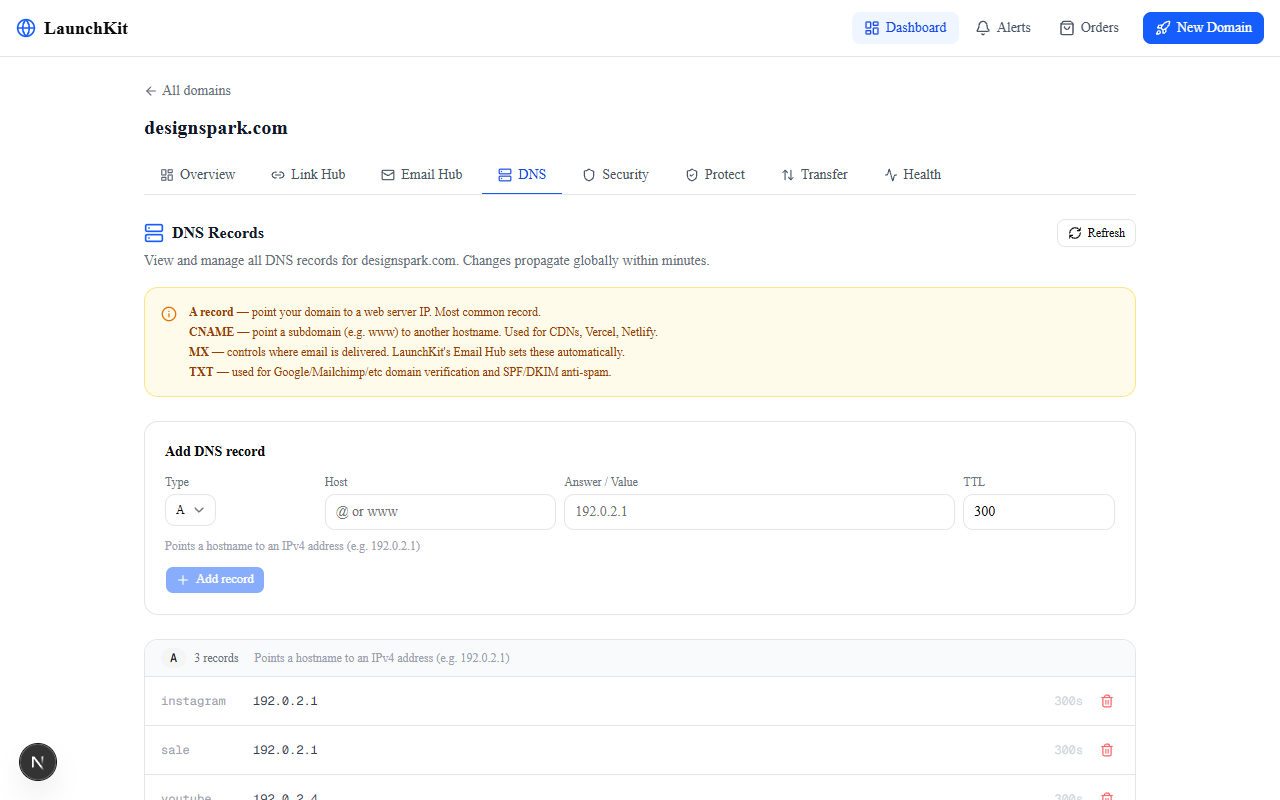
ListRecords, CreateRecord, DeleteRecord, and ZoneCheck.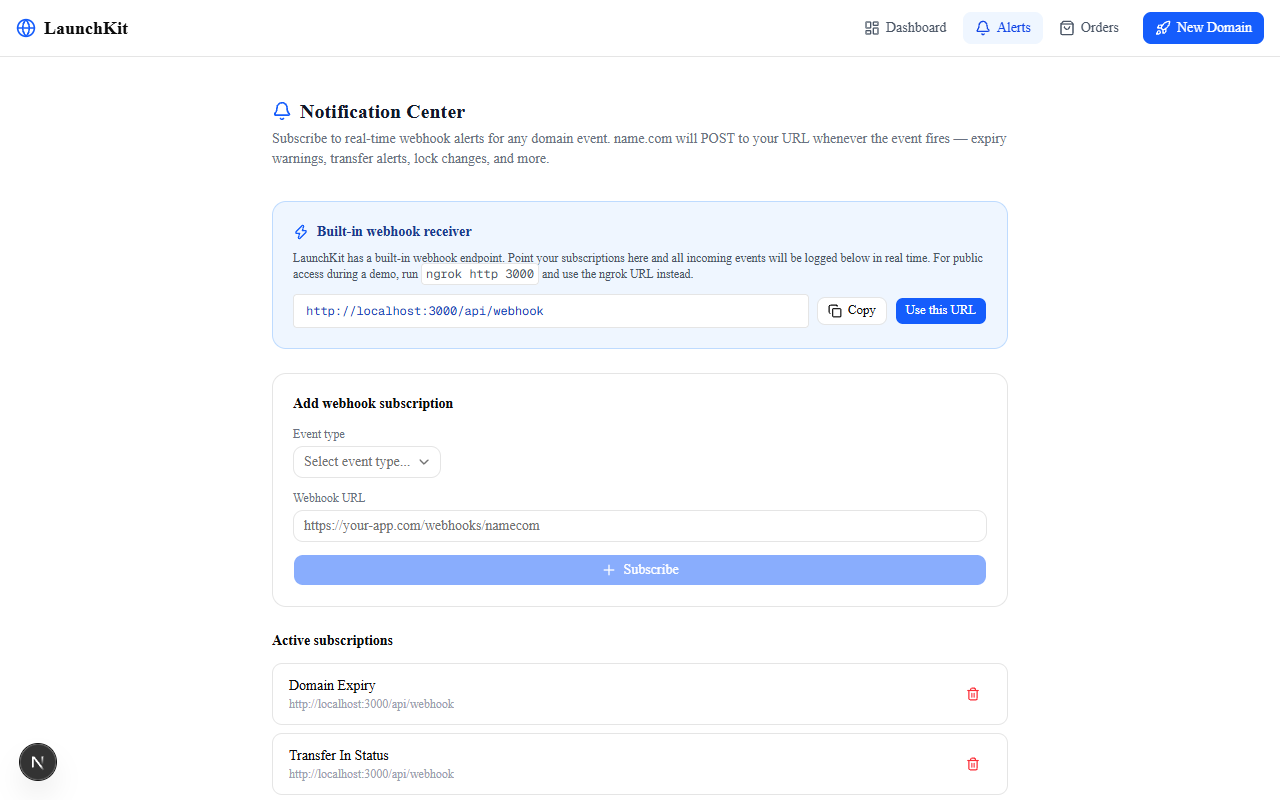
SubscribeToNotification. LaunchKit ships its own /api/webhook receiver. Send a test event and watch the payload appear live in the log. Pipe it to Slack, your CRM, or any HTTP endpoint.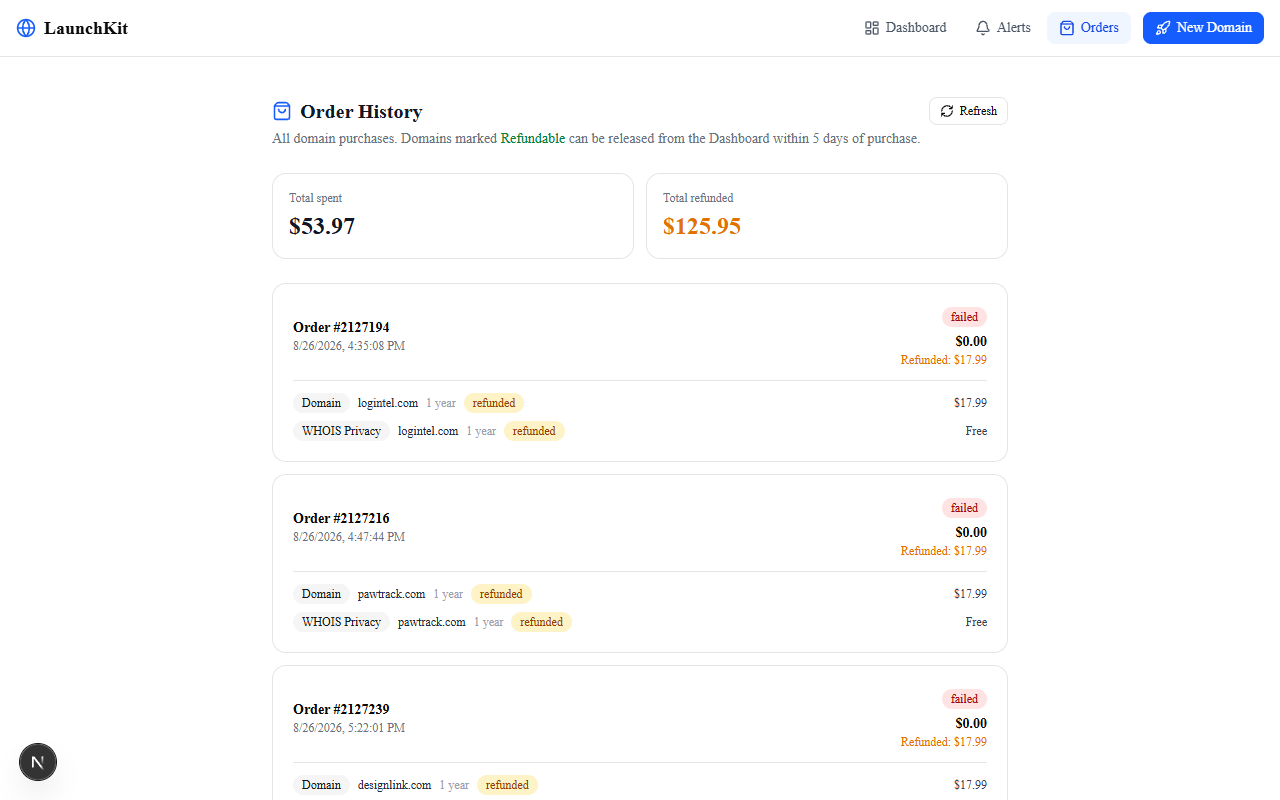
ListOrders pulls every domain purchase. Each order shows item-level refund status. ProcessRefund lets you request a refund within the add-grace period, directly from the dashboard.How It Works
A single Next.js app. All name.com API calls happen in server-side API routes — credentials never touch the browser. Claude handles name generation and brand kit. In-memory state covers brand profiles and click counters (trivially replaceable with a KV store in production).
-
1
Describe your business → AI names
The browser POSTs to
/api/generate. That route calls Claude with a structured prompt. Eight brand names come back with rationale. All server-side — the Anthropic API key never leaves the server. -
2
Availability + trademark check in one pass
/api/availabilitycallsSearchthenCheckAvailabilityfor all five TLDs in one batch.CheckDomainClaimsruns in parallel to surface trademark warnings before the user registers.TldPriceListprovides accurate pricing. -
3
Register → setup wizard
CreateDomainregisters the chosen domain. The setup wizard immediately offers two things:CreateEmailForwardingfor a professional email address andCreateURLForwardingfor the first branded link. Most founders need both in the first five minutes. -
4
Dashboard: manage everything from one place
ListDomainspowers the portfolio view. Each domain gets its own tabbed panel: Links, Email, Security, Brand Protection, DNS, Transfer, and Health. Every tab is a set of name.com API calls proxied through/api/domains/[domain]/*routes. -
5
Brand protection: 25 variants, 1 API call
CheckAvailabilityaccepts up to 50 domains per request. LaunchKit generates 25 variants (6 TLD, 10 typo, 9 prefix/suffix) and sends them all in one call. The Brand Safety Score is(1 − taken/total) × 100. Green variants link directly to the registration flow. -
6
Brand page: live at /b/[domain]
The public brand page fetches the profile from
/api/profile/[domain](in-memory store, POST from the dashboard edit panel) and the link list from/api/domains/[domain]/links. Every link click silently POSTs to/api/track/[domain]/[slug]. Counts visible in the Link Hub dashboard, invisible to visitors.
Architecture
Three layers. The browser talks to Next.js API routes. The API routes talk to name.com (and Claude for AI features). Credentials never reach the client. In-memory state covers ephemeral data that doesn’t need persistence.
Component Map
Every file in the project, its responsibility, and what it connects to. The pattern is consistent: each page fetches via its /api/domains/[domain]/* route, which wraps the relevant name.com endpoints.
| File | Type | What It Does |
|---|---|---|
src/lib/namecom.ts | Library | Typed client for all 48 name.com endpoints. HTTP Basic Auth, error handling, response types. Every API route imports from here. |
src/lib/claude.ts | Library | Anthropic SDK wrapper. Two functions: brand name generation and brand kit (tagline/bio/theme). Used by /api/generate and /api/brandkit. |
src/lib/utils.ts | Library | Tailwind class merge utility (cn()). Used by all UI components. |
src/components/nav.tsx | Component | Top nav bar — logo, links, theme toggle. |
src/components/ui/* | UI primitives | shadcn/ui: Button, Input, Badge, Card, Alert, Tabs, Dialog, Toast, Label, Select, Textarea. |
src/app/page.tsx | Page | Landing page. $56/month savings breakdown. Links to launch wizard. |
src/app/launch/page.tsx | Page | Business description form. POSTs to /api/generate for AI names. |
src/app/launch/results/page.tsx | Page | Availability grid. Trademark warnings. Pricing. Register button → /api/register. |
src/app/launch/setup/page.tsx | Page | Post-registration wizard. Email forwarding + first branded link in two steps. |
src/app/dashboard/page.tsx | Page | Portfolio view. ListDomains → cards with expiry and lock status. |
src/app/dashboard/[domain]/layout.tsx | Layout | Tab navigation for a domain: Overview / Links / Email / Security / Protect / DNS / Transfer / Health. |
src/app/dashboard/[domain]/page.tsx | Page | Domain overview. Brand card, stats grid, launch checklist, profile editor with AI Brand Kit. |
src/app/dashboard/[domain]/links/page.tsx | Page | Link Hub. CRUD for URL forwardings. Per-link click counts fetched from /api/track. |
src/app/dashboard/[domain]/email/page.tsx | Page | Email Hub. CRUD for email forwardings. Add, edit, delete routes. |
src/app/dashboard/[domain]/security/page.tsx | Page | Security Center. Lock/WHOIS/DNSSEC/auto-renew as a 0–4 score with one-click toggles. |
src/app/dashboard/[domain]/protect/page.tsx | Page | Brand Protection. Calls /api/domains/[d]/protect, renders Safety Score and variant grid. |
src/app/dashboard/[domain]/dns/page.tsx | Page | DNS Manager. Full CRUD for all record types grouped by type. |
src/app/dashboard/[domain]/transfer/page.tsx | Page | Transfer Manager. Auth code export, inbound transfer eligibility, cancel unauthorized outbound. |
src/app/dashboard/[domain]/health/page.tsx | Page | Domain health. Expiry countdown, ZoneCheck result, renewal button. |
src/app/b/[domain]/page.tsx | Page | Public brand page. Fetches profile + links. Animated mesh, 6 themes, CTA button, link cards. |
src/app/notifications/page.tsx | Page | Notification Center. Webhook subscription CRUD + live event log from /api/webhook. |
src/app/orders/page.tsx | Page | Order history. ListOrders + ProcessRefund for items in add-grace period. |
src/app/api/domains/[domain]/protect/route.ts | API Route | Generates 25 variants, calls CheckAvailability in one request, returns Safety Score. |
src/app/api/profile/[domain]/route.ts | API Route | In-memory brand profile store. GET returns current profile, POST updates arbitrary JSON fields. |
src/app/api/track/[domain]/[slug]/route.ts | API Route | Per-link click counter. GET returns count, POST increments. In-memory, server-scoped. |
src/app/api/webhook/route.ts | API Route | Inbound webhook receiver. Appends payloads to an in-memory log. Notifications page polls this. |
48 API Endpoints
Every endpoint in the name.com Core API that applies to the product’s scope. Grouped by category.
| Category | Endpoints | Used For |
|---|---|---|
| Domain lifecycle | ListDomains GetDomain CreateDomain RenewDomain EnableAutorenew DisableAutorenew | Portfolio, health, registration, renewal, auto-renew toggle |
| Availability | Search CheckAvailability TldPriceList CheckDomainClaims GetTldRequirementsV2 | AI launch wizard + brand protection scanner |
| Security | LockDomain UnlockDomain EnableWhoisPrivacy DisableWhoisPrivacy PurchasePrivacy | Security Center toggles |
| DNSSEC | ListDNSSECs CreateDNSSEC GetDNSSEC DeleteDNSSEC | Security Center DNSSEC section |
| URL Forwarding | ListURLForwardings ListURLForwardingsByDomain GetURLForwardingById CreateURLForwarding UpdateURLForwardingById DeleteURLForwardingById | Link Hub + brand page |
| Email Forwarding | ListEmailForwardings GetEmailForwarding CreateEmailForwarding UpdateEmailForwarding DeleteEmailForwarding | Email Hub |
| DNS Records | ListRecords GetRecord CreateRecord UpdateRecord DeleteRecord ZoneCheck | DNS Manager + domain health |
| Transfers | GetTransferEligibility CreateTransfer ListTransfers GetTransfer CancelTransfer GetAuthCodeForDomain CancelOutboundTransfer | Transfer Manager |
| Notifications | SubscribeToNotification GetSubscribedNotifications ModifySubscription DeleteSubscription | Notification Center |
| Orders | ListOrders GetOrder ProcessRefund | Order history + refund manager |
What We Actually Learned
CheckAvailability accepts up to 50 domains in a single call. We initially planned to call it once per variant — that would have been 25 sequential requests. Reading the API docs carefully revealed the batch parameter. The brand protection scanner went from a 30-second wait to a 2-second scan. The feature only became viable because of that one detail.NAMECOM_API_TOKEN never reaches the browser. This wasn’t a security afterthought — it was the first architectural decision. The benefit: the client-side code is completely decoupled from the API shape. When we changed how security data was aggregated, only the API route changed. The React components didn’t notice.profile.name is empty, derive it from the SLD. designspark.com → Designspark. The page went from looking like a broken template to looking like a brand page, even with zero content configured..ps1 temp file per slide. The path to the output WAV was escaped with doubled backslashes (C:\\path\\to\\file.wav) following the usual JavaScript string convention. PowerShell treated the doubled backslashes as literal path separators and SAPI failed to open the file. The fix: use forward slashes. PowerShell and SAPI both accept C:/path/to/file.wav without escaping. One character change fixed a bug that looked like a permissions problem.GET /api/profile/[domain], POST /api/profile/[domain] with arbitrary JSON) is exactly what a KV store like Upstash or Vercel KV would use. Swapping the implementation is a one-file change.Moments In Between
checkAvailability accepts an array of up to 50 domains. The entire feature changed from “maybe too slow to demo” to a 2-second scan. Sometimes the API does exactly what you need; you just have to read it.--screenshot flag. Every dynamic page was captured before the API data arrived — skeleton states everywhere. The fix: Puppeteer with waitUntil: ‘networkidle0’ plus per-page extra wait times tuned to each route’s fetch latency. The gallery went from loading spinners to real data in all 12 shots.Platform Review: name.com API
An honest take on building against the name.com Core API v1 for a week-long hackathon.
- HTTP Basic Auth is simple and reliable — no OAuth flow to debug
CheckAvailabilitybatch parameter (up to 50 domains) made the brand protection feature viable- Sandbox at
api.dev.name.comis fully functional — real CRUD, no fake responses, no charges - Consistent REST conventions across all endpoint categories — easy to build a typed client
CheckDomainClaimsis a genuinely useful endpoint that most registrars don’t expose- Webhook subscription model is straightforward — subscribe to a topic, receive at your URL
- No real-time event streaming — webhook delivery requires polling the receiver endpoint
- Some endpoints return undocumented fields; a few documented fields are sometimes absent
ZoneCheckresult format is not well-documented — had to infer the schema from responses- Rate limiting is not publicly documented; had to be conservative with parallel calls
- Transfer status codes require inference — no enum reference in the docs
- No built-in pagination cursor for
ListOrderson large accounts
| Feature | name.com API | What We’d Want |
|---|---|---|
| Bulk availability check | ✓ Up to 50 domains per call | — |
| Trademark warnings | ✓ CheckDomainClaims | — |
| Webhook subscriptions | ✓ Multiple event types | Real-time push rather than pull |
| Email forwarding | ✓ Full CRUD, MX auto-set | — |
| API documentation | Mostly complete | Enum values for status codes |
| Sandbox fidelity | High — real CRUD | — |
The Team
Get Started
Open http://localhost:3000. Describe a business and watch it generate names. The name.com sandbox is fully functional — real domain registration, real forwardings, real DNS changes, zero charges.
Get a name.com API token: name.com → Account Settings → API Access → Create token. The Anthropic API key is optional — all name.com features work without it.